So this page is starting out pretty small, but we might make it bigger as we go? Consequently, here's a table of contents. (Presented in no particular order.)
This macOS app dims the background of all windows except the currently focused one. The transition is smooth and responsive. Its interpolation timing/duration can be customized, and of course the strength of the dimming can be set to any opacity too. The latter is just via slider in the menu bar, so it's easy to adjust anytime!
We use HazeOver for focus and clarity. It's not really to reduce distractions per se (our screen usually isn't cluttered), but it does help us into a less distractible mindset.
HazeOver dims bright Safari webpages that aren't coded to adapt to a dark system color scheme, as well as the desktop wallpaper, so it lets the current state of what's on-screen not "get in the way" as much. There's less meta to tune and grumble over, so more brain-space to just do whatever we're doing.
We use some built-in macOS features to make our computer more accessible, too.
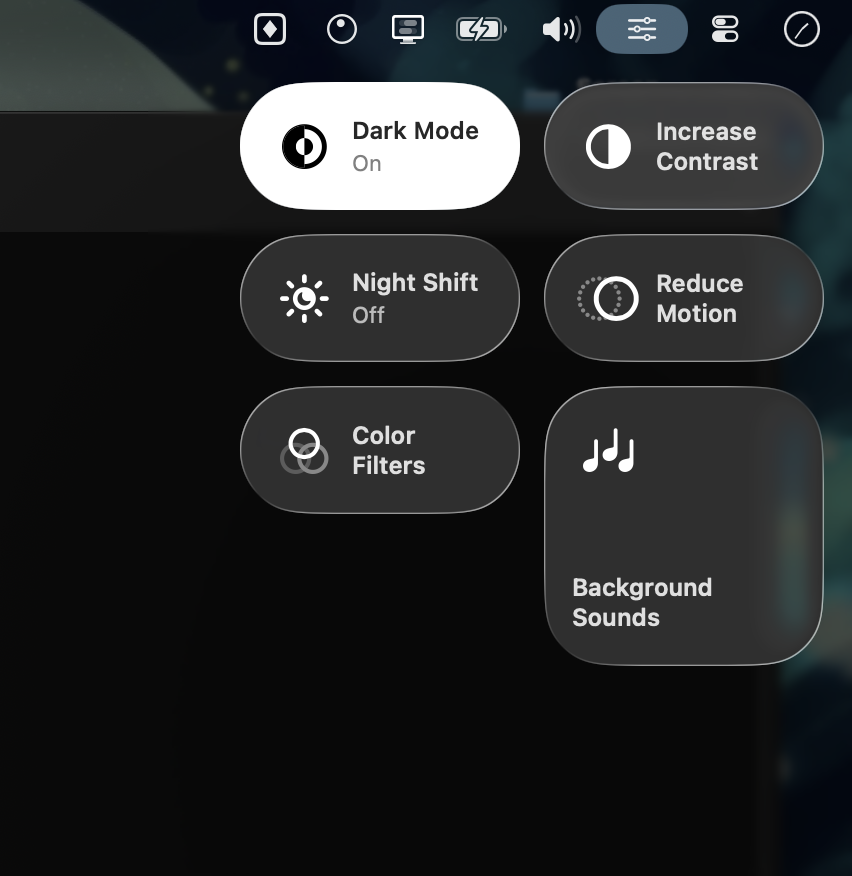
We regularly switch between light and dark mode, although we're usually in dark mode.
We keep a page of Control Center controls for various accessibility toggles.
We often have Background Sounds enabled. There's a wealth of customization options there but we usually just keep it on calming rain ASMR 2025 ("Rain On Roof"). We mostly use it in our room where it serves a noise filter, gentler then running a physical fan in the background (our preference for sleep). We've hooked this into Loopback so that our volume keys just change a passthrough source, rather than the actual system volume level; meanwhile Background Sounds goes directly into system audio output, skipping the passthrough and playing at max volume. This way the knob on our desk speakers is the only control for background sounds, making it a more physical, graspable, real-world thing, less a trick of software.
We don't use Stage Manager so much anymore (let alone split view in fullscreen), but it's had its place making doing stuff on computers easier for us.
On the other hand, we do use two desktop spaces. We just go by feeling, so they don't have totally discrete identities, but the first is usually for more "serious" "work", while the second is looser, airier, kind of more calm. Of course they have different wallpapers. macOS also remembers your wallpaper set per set of active displays, so these also (sometimes) differ between using our MacBook Air at our desk and going portable.